


µTorrent®- Torrent Downloader
4.7151.17K Reviews
App Specs
- Version
- 8.3.6
- Updated On
- License
- Free
- Downloads
- 100,000,000+
- Developer
- bittorrent.com
- Categories
- Video Players & Editors
- Platform
- Android
Screenshots
 Analysis by AppCompare
I tend to think of a torrent app less as a general downloader and more as a way to manage files that arrive through a peer-to-peer network. That distinction matters: the experience depends not only on the app, but also on the file, the available peers, and the connection I’m using. µTorrent®- Torrent Downloader makes that process approachable on a phone, while still showing enough download information to help me understand what is happening instead of leaving me to guess.
Managing torrent downloads on a phone
I find torrenting on a phone works best when I treat it as a small, planned task rather than a set-and-forget download queue. Checking the connection and available storage before adding a file can prevent needless interruptions, and looking at peer activity helps me tell a slow source from a stalled transfer. That practical routine leads naturally to the controls that make mobile downloads easier to manage.
A focused tool for transfers and playback
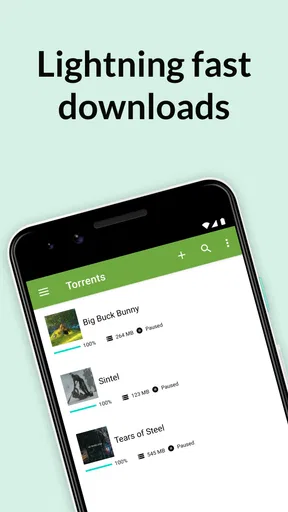
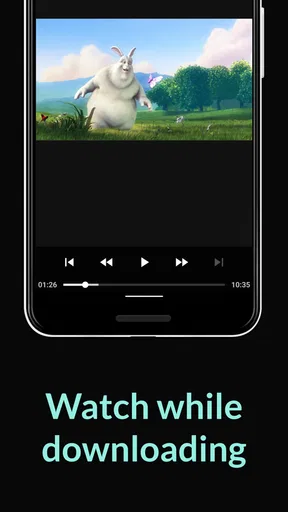
The main appeal is having torrent transfers and media playback together in one place. Rather than treating a download as a file that must immediately be handed off to another app, I can use the built-in player for compatible media and keep the transfer list close at hand. That can make a phone feel like a practical place to collect and check files, especially when I don’t need a desktop workflow.
It is a video players and editors app from Rainberry, Inc., and its long-running presence is reflected in an average rating of 4.7 from around 5.4 million ratings. More than 100 million installs suggest that many people use it, though popularity alone does not tell me whether it fits a particular person’s habits. The useful question is whether I want a mobile torrent client with playback and transfer controls, rather than a conventional streaming or cloud-storage app.
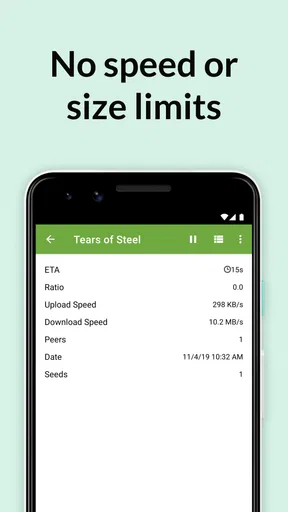
For someone who already knows how torrents work, the app keeps familiar ideas visible without making every session feel technical. For a newcomer, that same visibility can be helpful: the transfer is not just a mysterious progress bar, and the peer and seed details offer clues about why one file moves faster than another.
What the controls change in everyday use
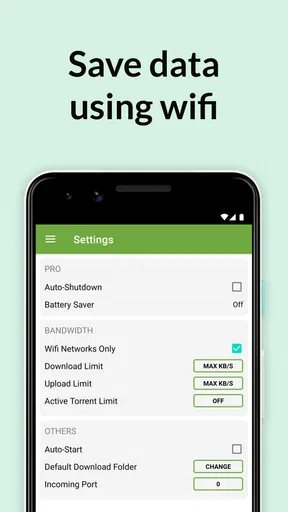
The Wi-Fi-only option is a practical safeguard when I’m away from home. I can avoid starting transfers over mobile data by mistake, then let them run once I’m connected to a suitable network. Download and upload limits add another layer of control. I’d use them when I want a transfer to proceed in the background without taking over the connection I need for a call, a video meeting, or browsing.
A useful habit is to check those limits before adding a large transfer, not after the connection starts feeling slow. A modest cap can make downloads less disruptive, but it also means they may take longer. If I’m on a stable home connection and want a file sooner, I can choose a less restrictive setting; if other people are sharing the network, restraint may be the better trade-off.
Worth Reading Before You Choose

Flipboard Shows What News Apps Must Do Beyond the Feed

Switching to Android Auto Means Rethinking Your Driving Routine

Google Calendar Makes a Crowded Week Easier to Manage

Ludo King Makes the Most of the Minutes Between Plans

Baby Panda World Brings Quick Play to Modern Phones, but Its Game Library Feels Busy

ESPN’s Live Game View Makes Following Close Games Easier
Magnet links also simplify the handoff from a browser or another source. Instead of managing a separate torrent file, I can open a magnet link and let the app take over. I still need to judge the source carefully: convenience at the link-opening stage does not tell me whether a file is trustworthy or lawful to download.
A realistic use case, with a little planning
Imagine I’m at home in the evening and want to download a freely shared video for a trip. I can wait until I’m on Wi-Fi, add the magnet link, set a transfer limit if other people are using the network, and check the peers and seeds if progress seems slow. Once the file is ready, I can try playing it in the app before I leave. That small check matters: it is better to discover a playback or file issue at home than when I’m already offline.
For a collection of music files, the integrated player can save a switch between apps when I simply want to check what arrived. I would still keep a dedicated media player in mind for a larger library, playlists, or a listening routine built around more detailed organization. The strength here is convenience around a transfer, not replacing every specialist player on a phone.
Storage planning is another easy-to-miss part of mobile torrenting. Before starting several transfers, I’d make sure the phone has room for the files I actually want to keep. A download can be progressing normally and still become inconvenient if it leaves too little space for photos, updates, or other everyday use. I’d add files selectively, check what has finished, and remove anything I no longer need rather than treating the phone as unlimited storage.
Where it sits among mobile alternatives
Compared with a browser download manager, a torrent client is built for peer-to-peer transfers and exposes details such as peers and seeds. That makes this app more useful when the source is a torrent or magnet link, but less suitable for an ordinary direct download. A browser is simpler for a single file from a conventional website; a cloud-storage app is a better fit when I want to sync documents between devices or share them through an account.
Against a desktop torrent client, the mobile version is appealing for quick checks and downloads that make sense on a phone. A computer remains the more comfortable choice for managing a large queue, organizing extensive files, or keeping a device dedicated to long-running transfers. I would not choose a phone app simply because a task involves torrents; I’d choose it when portability and straightforward controls matter more than a larger screen and a desktop-style workflow.
It is free to install, has an Everyone content rating, and the current version is 8.3.6, with Android 7.0 listed as the minimum operating system. In-app purchases are listed at $2.99 per item. Those details make the entry point clear, but I’d still decide based on how I feel about the app’s ads and whether I actually need the extra option described in the app. If ads bother me, that is a real consideration; if I only download occasionally, paying to change that experience may not be worthwhile to me.
Trade-offs worth understanding before you begin
Speed is not something an app can guarantee for every torrent. A file with few active peers may crawl even on good Wi-Fi, while another may move quickly under the same conditions. When a transfer stalls, the peer and seed information gives me a useful first check: if there is little activity available, changing phone settings is unlikely to solve the underlying issue. I would also avoid assuming that an unexplained delay means the app has failed.
There is a balance between setting generous limits and keeping the phone pleasant to use. Less restrictive transfer settings can help finish sooner, but heavy background activity may compete with other network use. Wi-Fi-only downloading reduces the chance of an unwanted mobile-data transfer, yet it also means a download waits when I leave Wi-Fi. I see these controls as choices to make for each situation, not settings that are automatically right for everyone.
Privacy and safety also depend on what I choose to download and where I get it. Torrent technology is a transfer method, not a guarantee about the contents of a file. I would stick to sources I trust and content I have the right to access, and I would be cautious about unfamiliar files. The app’s transfer information can show network activity, but it cannot make a questionable source safe.
The app includes ads, which may interrupt the otherwise practical feel for people who prefer a completely uncluttered interface. Its focus is also specific: it is for torrent transfers and nearby playback, not for streaming a catalogue, syncing all my files, or acting as a full-featured media library. Knowing that boundary helps avoid expecting it to replace tools designed for those jobs.
Who is likely to get the most from it
I’d recommend it to someone who already uses legitimate torrents, wants to manage them directly from an Android phone, and values being able to inspect a transfer rather than relying on a bare download indicator. The Wi-Fi option and transfer limits are especially useful for people who share a connection or keep an eye on mobile data. Being able to play media in the same app is a welcome extra when the goal is simply to check or enjoy a downloaded file.
I’d skip it if I rarely use torrents, mainly download files through ordinary web links, or want a polished streaming service with ready-made content. Someone managing a large media archive may be happier with a computer and a dedicated library app. And if I’m uncomfortable evaluating torrent sources, I would not treat a simple interface as a reason to download indiscriminately.
My overall view is that the app’s value lies in making a particular workflow manageable on mobile: add a torrent or magnet link, control how it uses the connection, watch its progress, and try the resulting media without immediately changing apps. That is a focused job, and the controls make it more flexible than a basic download screen. I’d keep expectations grounded around network conditions, storage, and source quality, but for a phone-based torrent workflow, it is a sensible option to consider.
Getting Started with µTorrent®
Diving into µTorrent® is pretty straightforward. The app is available for both Android and iOS, and you can snag it from the Play Store or the App Store. Installation was a breeze, and it didn’t take up much space on my device, which is always a plus.
Once you open the app, you’re greeted with a clean interface. Everything's laid out simply, which means you don’t have to be a tech geek to navigate through it. I really appreciated that because, let's be honest, who has the time to deal with complicated menus?
Features that Stand Out
Now, let's get into the juicy stuff. One of the first things I noticed is how lightweight the app is. It runs smoothly without hogging all your phone’s resources. I was able to download a couple of files without a hitch. The download speeds were surprisingly good, given that I was using my regular Wi-Fi connection.
Another cool feature is the ability to play media directly from the app. I tried this out with a couple of music files, and it worked like a charm. No need to switch over to another media player. It’s all integrated!
For those concerned about data usage, there’s a nifty option to download only on Wi-Fi. This is a lifesaver if you’re trying to manage your data plan. Plus, the app lets you set download and upload limits, so you’re always in control.
Usability and Experience
Using µTorrent® felt intuitive. I didn’t have to fiddle around to figure out how to start a torrent. Just search for your desired file, tap, and boom—it’s downloading. The app supports magnet links too, which is super handy. You just click on the link, and the app does the rest.
One thing I found particularly useful was the detailed download info. You can see everything from the download speed to the number of peers and seeds. It’s nice to have that visibility, especially if you’re trying to optimize your download times.
Security and Privacy
Now, if you're like me, you might have some concerns about privacy. The app does have some ads, but they’re not too intrusive. There’s also a premium version available if you want to go ad-free. I didn’t opt for it, but it’s nice to have the option.
As for security, the app itself doesn’t seem to pose any risks, but remember, downloading torrents can sometimes be a bit of a minefield. Always make sure you’re downloading from reputable sources.
Final Thoughts
All in all, µTorrent®- Torrent Downloader is a solid choice if you’re looking for a robust torrenting app for your mobile device. The ease of use, combined with its efficient performance, makes it a winner in my book. Whether you’re a seasoned torrenter or just starting out, this app has got you covered.
If you’re ready to give it a shot, head over to the Play Store or App Store, and start downloading your favorite content hassle-free. Happy torrenting!
Pros
- Fast download speeds enhance user experience.
- Lightweight app
- minimal device resource usage.
- User-friendly interface
- easy to navigate.
- Supports multiple simultaneous downloads.
- Efficient battery usage
- extends mobile use.
Cons
- Contains ads
- which can be distracting.
- No built-in media player for previewing files.
- Limited features in free version.
- Requires stable internet for optimal performance.
- Privacy concerns with torrenting activities.
FAQs for µTorrent®- Torrent Downloader
What is µTorrent® - Torrent Downloader and how does it work?
µTorrent® - Torrent Downloader is a lightweight, efficient app for downloading torrents on Android devices. It allows users to search, download, and manage torrent files directly from their smartphone. The app utilizes peer-to-peer file sharing technology, which distributes data across users, ensuring faster download speeds and reducing server load.
Is µTorrent® safe to use on my Android device?
µTorrent® is generally safe if downloaded from a reputable source like the Google Play Store. However, users should be cautious about the torrents they download, as some files may contain malware or illegal content. Always check torrent comments and ratings to ensure the files are safe and legal.
What are the key features of µTorrent® - Torrent Downloader?
Key features of µTorrent® include fast download speeds, Wi-Fi only mode to save mobile data, integrated media player, and the ability to select files within a torrent. Additionally, it supports RSS feeds, has a simple interface, and allows users to limit download and upload speeds to manage bandwidth usage effectively.
Are there any costs associated with using µTorrent®?
µTorrent® offers a free version with ads, allowing users to access all basic features. For those seeking an ad-free experience and additional features, there is a Pro version available for purchase. The Pro version includes benefits like automatic virus scans and an integrated media player without interruptions.
What should I consider before downloading µTorrent®?
Before downloading µTorrent®, consider your device's storage capacity and internet plan, as torrents can be large and data-intensive. Ensure your Android device meets the minimum system requirements, and be aware of local laws regarding torrent usage, as downloading copyrighted material without permission can be illegal in many regions.


